My Honest Take on the "4K Webcam for PC"
As someone who spends a good chunk of my week on video calls – whether it's for client meetings, team stand-ups, or helping my kid with his online classes – a reliable webcam isn't just a nice-to-have, it's essential. My old built-in laptop camera was, frankly, embarrassing. The image was grainy, the colors were washed out, and the audio picked up every single background noise. So, when I stumbled upon this 4K Webcam for PC, promising sharp video and noise-cancelling mics, I figured it was time for an upgrade. I’ve been using it for a few weeks now, and here’s what I’ve really found.
First Impressions & Setup
The webcam arrived quickly, and out of the box, it felt pretty solid. It's not overly heavy, but it doesn't feel cheap or flimsy either. The design is sleek and understated, which I appreciate – no flashy lights or bizarre shapes. The setup was, genuinely, a breeze. I plugged it into a USB port on my desktop, and Windows 11 recognized it instantly. No drivers to download, no software to install, no reboots. That "Plug&Play" claim isn't just marketing fluff; it actually works. I was up and running in less than 30 seconds, which was a pleasant surprise.
Video Quality: Is it Really 4K?
Let's talk about the star of the show: the 4K video. My expectations were tempered, knowing that "4K" on a budget webcam often means something closer to a very good 1080p, or 4K only in ideal conditions. However, I was genuinely impressed with the clarity this webcam delivers. In good lighting, the image is crisp, colors are accurate, and details like my facial expressions and background elements are clear. It's a massive leap from my old laptop camera. My colleagues immediately noticed the difference, commenting on how much sharper and more professional I looked.
In less-than-ideal lighting, it holds its own pretty well. It doesn't magically turn a dimly lit room into a studio, but it handles lower light better than many other webcams I've tested over the years. There's some graininess, sure, but it's not distracting, and you're still clearly visible. For online teaching, where showing documents or fine details might be important, this clarity is a huge advantage. If you want to grab it on Amazon and see for yourself, I think you'll be pretty happy with the visual upgrade.
Auto Focus: Smooth Operator or Hunt-and-Peck?
The "Stable Auto Focus" claim got my attention because nothing is more annoying than a webcam that constantly struggles to focus. I'm happy to report that this webcam's auto-focus is quite good. It locks onto my face quickly and generally stays put. If I lean in or move back, it adjusts smoothly without that jarring "hunting" effect that some cheaper webcams exhibit. It's not instant, but it’s fast enough for typical video conferencing. I also appreciate that it doesn't lose focus if I briefly move out of frame and then return. This stability is a big plus for presentations or interactive sessions.
Audio Quality: The Noise-Cancelling Microphones
This was another big selling point for me. My home office isn't always quiet; there's the hum of my PC, sometimes a dog barking outside, or even my partner talking in the next room. The dual noise-cancelling microphones on this webcam really do make a difference. I ran a few tests, purposefully typing loudly on my mechanical keyboard, and my colleagues said they could barely hear it. The mic prioritizes my voice, making it sound clear and natural, while effectively suppressing most ambient background noise. It's not going to silence a jackhammer, but for typical home office sounds, it performs admirably. For anyone doing remote communication where clear audio is paramount, like online therapists or tutors, this feature alone is worth considering.
Build & Design
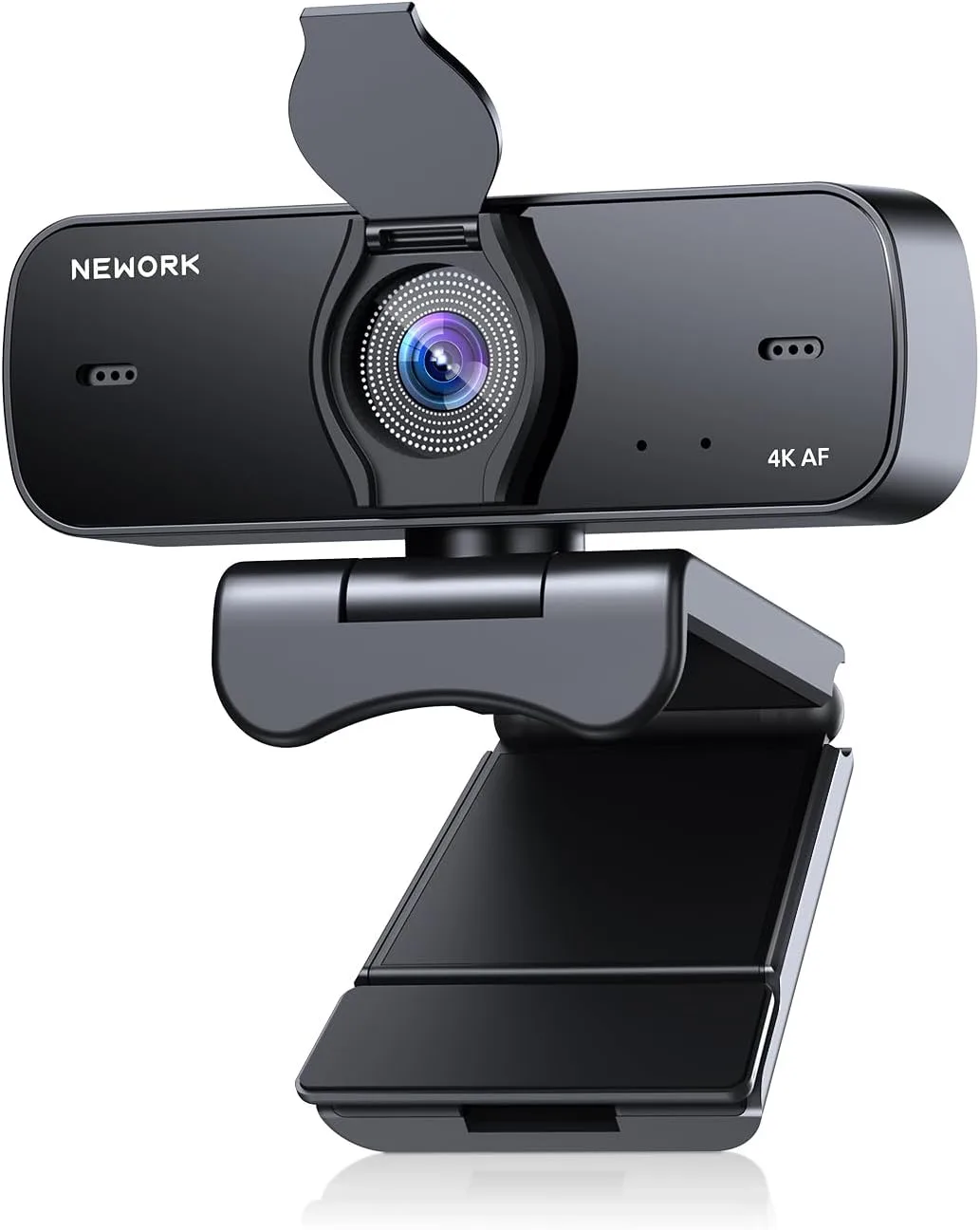
The webcam has a universal clip that sits securely on top of my monitor. It's adjustable, so I could angle it perfectly. It also has a standard tripod thread on the bottom, which is a nice touch if you want to mount it on a small desktop tripod for more flexibility. The integrated privacy cover is a simple but essential feature. It's a little sliding plastic piece that covers the lens, giving you peace of mind when you're not on a call. The USB cable is a decent length, long enough for my desktop setup, but if your PC tower is far away, you might need an extension. Overall, it's a practical and functional design.
What I Liked (Pros)
- Excellent Video Clarity: For a webcam in this price range, the image quality is surprisingly sharp and vibrant in good lighting.
- Effective Noise-Cancelling Mics: My voice comes through clearly, and background distractions are noticeably reduced.
- True Plug & Play: No drivers or software needed, worked instantly on Windows and even my Mac.
- Stable Auto Focus: Quick and smooth adjustments without constant hunting.
- Integrated Privacy Cover: A simple, effective way to ensure privacy.
- Versatile Mounting: Secure clip and tripod thread offer flexibility.
What Annoyed Me (Cons)
- Low Light Performance: While better than my old camera, it still introduces some noticeable graininess in very dim conditions. You'll definitely want a bit of light on your face.
- Fixed Field of View: It's a decent wide angle, but there's no way to adjust it. Sometimes I wished it was a little narrower to crop out more of my messy office.
Final Thoughts & Recommendation
After several weeks of daily use, I'm genuinely impressed with this webcam. It’s a significant upgrade from built-in laptop cameras and even many older standalone webcams. It delivers on its promises of clear video and decent audio, making my virtual presence much more professional. For the price, it's hard to beat the feature set and performance. If you're tired of looking blurry and sounding muffled on your calls, this is definitely one to consider. You can check today's price and see if it fits your budget – I think it's a solid investment.
Who Should Buy This
- Remote Workers: Anyone needing a clear, reliable camera and mic for daily meetings.
- Online Educators/Students: Great for virtual classrooms and presentations where good audio/video is key.
- Casual Streamers: If you're just starting out and don't want to break the bank, this offers a good image.
- Anyone with a Dated Webcam: If your current camera is blurry or has poor audio, this is a significant upgrade.
Who Should Skip It
- Professional Content Creators/Serious Streamers: While good, it's not going to replace a dedicated DSLR or high-end streaming camera with advanced features and manual controls.
- Users in Extremely Dark Environments: If you absolutely cannot have any external lighting, you might want a webcam specifically advertised for superior low-light performance (which usually costs more).
- Those Needing Adjustable Field of View: If you need to zoom in/out or adjust the angle digitally, this fixed lens might not be for you.
Overall, for its target audience of everyday remote communicators, this webcam is a fantastic choice. For a quick and easy upgrade to your video call quality, you should definitely pick one up here.