My Honest Take on the Google TV 4K Streamer
I've been a streaming device enthusiast for years, cycling through various Fire Sticks, Rokus, and even some lesser-known brands. So, when the Google TV 4K Streamer crossed my desk, I was genuinely excited to see what Google had cooked up this time around. I picked one up recently, curious if it could truly elevate my living room experience, and I've spent the last few weeks putting it through its paces. If you're currently in the market for a new streaming device, or just curious if an upgrade is worth it, stick around because I've got the full scoop.
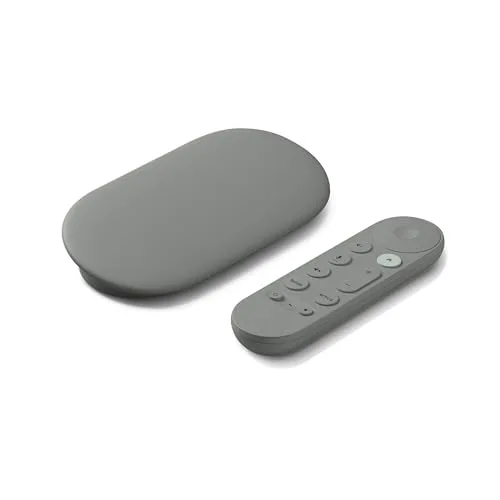
First impressions? The device itself is pretty sleek and unobtrusive. It's a small, pebble-shaped dongle that plugs directly into an HDMI port, powered by a USB-C cable. The remote is compact, comfortable to hold, and thankfully, not overly cluttered with buttons. My previous streaming stick remotes often felt like cheap plastic, but this one has a nice tactile feel. Setup was a breeze, as expected with most modern tech. I plugged it in, connected it to my Wi-Fi, signed into my Google account, and within about 10 minutes, I was ready to dive into the Google TV interface.
The Google TV Experience: A Breath of Fresh Air?
What immediately struck me about the Google TV interface is its focus on content discovery. Unlike other platforms that primarily present you with app icons, Google TV has a prominent "For You" tab that acts as a centralized hub for recommendations. It pulls content from all your linked streaming services – Netflix, Disney+, Prime Video, HBO Max, YouTube, you name it – and presents it in a unified, personalized feed. I found this surprisingly helpful. Instead of hopping between apps trying to figure out what to watch, I'd often find something interesting right there on the home screen. It felt like my TV was finally working *for* me, not just as a portal to separate services.
However, I did notice a slight downside here. While the recommendations are good, sometimes the "For You" tab can feel a little overwhelming, especially if you have a lot of services. There's also a subtle push towards Google's own content (YouTube, Google Play Movies), which isn't a dealbreaker but something to be aware of. Still, the ability to quickly jump to a show or movie regardless of which app it's on is a huge convenience. If you want to check today's price and see for yourself, you can grab it on Amazon.
Performance and Picture Quality
As for performance, I've been really impressed. The interface is snappy, navigating menus is fluid, and apps launch quickly. I didn't experience any noticeable lag or stuttering, even when jumping between graphically intensive apps or high-bitrate 4K content. Speaking of 4K, the picture quality is fantastic. On my 4K TV, content looked crisp, vibrant, and incredibly detailed. HDR support (Dolby Vision, HDR10, HDR10+) means you're getting the best possible dynamic range for compatible content, and I could definitely see the difference in contrast and color depth compared to my older HD streamer.
The remote's built-in Google Assistant is a game-changer. I used it constantly for voice searches like "Find action movies on Netflix" or "Play the latest episode of [show name]." It accurately understood my commands almost every time and pulled up relevant results across all my services. It's so much faster than typing with an on-screen keyboard. I also appreciated the dedicated YouTube and Netflix buttons, which are pretty standard but always welcome for quick access.
What I Loved (Pros)
- Intuitive Google TV Interface: The "For You" tab genuinely helps with content discovery across all your services.
- Excellent 4K HDR Quality: Picture is sharp, colors are vibrant, and HDR support is top-notch.
- Snappy Performance: No noticeable lag, apps load quickly, and navigation is smooth.
- Google Assistant Integration: Voice search is incredibly effective and saves a ton of time.
- Compact Design: Plugs directly into your TV's HDMI port, keeping things tidy.
- Personalized Profiles: Great for households where everyone has different tastes, keeping recommendations separate.
What Annoyed Me (Cons)
- Limited Storage: With only 8GB of internal storage (and less available for apps), you can't install a ton of games or very large apps. For most streaming, it's fine, but power users might feel constrained.
- Remote Size: While comfortable, it's small enough that I occasionally misplaced it in the couch cushions.
- Some Interface Clutter: The "For You" tab, while useful, can sometimes feel a bit too busy with options you might not care about.
- No Ethernet Port: You'll need a separate adapter if you want a wired connection, which some might prefer for stable 4K streaming. This is typical for dongles, but worth noting.
Who Should Buy This
If you're tired of endlessly scrolling through separate streaming apps, or if your current streaming device is showing its age (especially if it's not 4K HDR capable), this Google TV streamer is a fantastic upgrade. It's perfect for anyone deeply entrenched in the Google ecosystem (Android phone users, Google Home owners) as it integrates seamlessly. It's also ideal for families or households with multiple users, thanks to its profile feature. If you prioritize content discovery and a smooth user experience over endless app installations, you should absolutely pick one up here.
Who Should Skip It
If you're an Apple ecosystem loyalist and already have an Apple TV, you likely won't find enough reason to switch. Also, if you're someone who loves to sideload a ton of apps, demanding lots of internal storage, the 8GB limit might be a dealbreaker. Lastly, if you already have a fairly new smart TV with a decent 4K interface that you're happy with, the benefits here might not justify the purchase. For those who absolutely need an Ethernet port built-in and prefer a box-style streamer, this dongle isn't for you.
Final Thoughts
After several weeks with the Google TV 4K Streamer, I can confidently say it's one of the best streaming devices I've used in its price range. It combines excellent 4K HDR performance with a truly smart and user-friendly interface that puts content first. While it has a couple of minor quirks, like the limited storage and the remote's size, these are easily outweighed by its strengths. The seamless integration of Google Assistant and the personalized recommendations truly make a difference in day-to-day use. It’s definitely worth considering if you’re looking to enhance your streaming setup. Ready to see what others paid? You can check it out on Amazon.