My Deep Dive into the Govee TV Backlight 3 Lite
I’ve been eyeing TV backlights for a while, always skeptical if they’d be more of a gimmick than a genuine enhancement. My living room setup is pretty standard – a decent 55-inch TV, but I wanted something to make movie nights feel a bit more special. That's when I stumbled upon the Govee TV Backlight 3 Lite, specifically intrigued by the new "Fish-Eye Correction" camera. I figured it was time to put Govee’s claims to the test. If you're wondering whether to grab it on Amazon, keep reading.
Unboxing and Initial Impressions
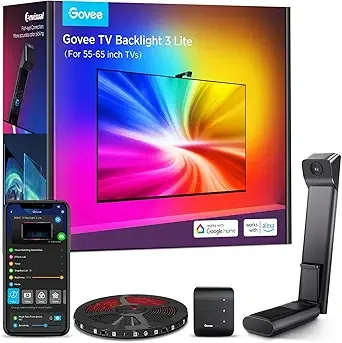
Right out of the box, the quality felt pretty solid. The light strips themselves are flexible but robust, and the camera unit felt well-made, not flimsy plastic. Installation, for the most part, was straightforward. I cleaned the back of my TV thoroughly, peeled the adhesive, and stuck the strips on. Govee includes clips to help manage the cables, which was a nice touch and kept things tidy. The camera attaches either to the top or bottom of your TV – I opted for the top. There's a little weight to it, so it felt secure. Routing the cables to the control box and then to power was simple enough.
The Setup Process: Camera Calibration and Fish-Eye Correction
This is where the magic (or frustration, depending on your tech savviness) happens. The Govee Home app guides you through the calibration. You stick foam squares onto your screen at specific points, and the camera "reads" them. This is crucial for the backlight to accurately map the colors from the screen to the wall. I've heard some people struggle with this part on older Govee models, but the Fish-Eye Correction on this version made it surprisingly painless.
Instead of wrestling with angles and getting perfect perspective, the software seems to intelligently correct for the camera's wide-angle view. I noticed that even if my calibration squares weren't *perfectly* aligned, the system still managed to get a very accurate reading. This was a huge relief, as I was dreading a half-hour battle with sticky foam. Once calibrated, I adjusted the brightness and saturation to my liking, and then it was showtime.
Performance: Lights, Camera, Immersion!
The first thing that hit me was the vibrancy. Govee's RGBIC technology means the strips can display multiple colors at once, which is a massive upgrade from older, single-color-per-strip systems. When watching a colorful nature documentary, the greens from the trees and blues from the sky genuinely extended onto my wall, creating a much larger, more immersive viewing area. It really does make the TV feel bigger and pulls you into the content.
- Color Accuracy: For the most part, the color matching is spot-on. Bright reds are bright red, deep blues are deep blue. There are occasional moments, especially with very subtle color shifts or extremely fast-moving, complex scenes, where it might lag by a fraction of a second or blend colors slightly differently than expected. But these are minor quibbles, not deal-breakers. The white light, a common complaint with some LED strips, looked pretty good and neutral, not too blue or yellow.
- Responsiveness: It's quick. Seriously quick. The lights react almost instantly to screen changes. This is where the Fish-Eye Correction really shines, because a more accurate initial capture means faster, more precise color reproduction.
- Brightness: These lights get bright! I usually keep them around 60-70% for movies, as 100% can be a bit overwhelming in a dark room. It's nice to have that headroom though.
- Modes: The Govee Home app is a powerhouse. Beyond just video mode, there are music sync modes (which are a blast for parties), and a ton of static scene modes or DIY options. I particularly enjoyed setting up a custom scene for ambient lighting when the TV wasn't in use.
The Govee Home App Experience
I can't stress enough how good the Govee Home app is. It's intuitive, well-designed, and offers a ridiculous amount of customization. You can fine-tune color accuracy, adjust sensitivity, create schedules, and even integrate with Alexa or Google Assistant. I linked it up with my Google Home, and now I can just say "Hey Google, turn on TV backlight" which is super convenient. If you want to pick one up here, you'll find the app is a huge part of the overall value.
My Pros and Cons
Pros:
- Incredible Immersion: Seriously, movies and games feel so much more engaging. It adds a depth you didn't know you needed.
- Excellent Color Accuracy: The RGBIC and Fish-Eye Correction work together beautifully to reproduce screen colors faithfully.
- Responsive: No noticeable lag in most scenarios; the lights keep up with fast-paced action.
- Powerful Govee Home App: Feature-rich, user-friendly, and offers extensive customization and smart home integration.
- Bright and Vibrant: Plenty of brightness for any room, and the colors pop.
- Relatively Easy Setup: The adhesive is strong, and the calibration, thanks to the new camera, is less finicky than expected.
Cons:
- Visible Camera: The camera sits on top (or bottom) of your TV. While small, it is noticeable if you look directly at it. For me, it blends into the background once I'm watching something, but it's there.
- Not for Flush Mounts: If your TV is mounted extremely close to the wall, you won't get that nice diffused glow. You need a few inches of space for the light to spread.
- Slightly Imperfect with Fast, Complex Scenes: Very occasionally, with extremely rapid, chaotic color changes, it might get a color slightly off for a split second. This is rare and barely noticeable, but worth mentioning for perfectionists.
- Price Point: It's not the cheapest backlight solution out there. However, for the quality and features, I think it's a fair investment. If you're on the fence, you might want to check today's price to see if there are any deals.
Who Should Buy This?
If you're looking to elevate your home entertainment experience beyond just the screen, this is for you. Gamers will love the added immersion, and movie buffs will appreciate how it brings scenes to life. If you already have other Govee products, this will integrate seamlessly. It's also great for anyone who wants a more dynamic ambient light setup in their TV room, even when not watching content.
Who Should Skip It?
If you prefer a completely minimalist setup with absolutely no visible tech on your TV, the camera might bother you. Also, if your TV is mounted very close to the wall (less than 3-4 inches gap), the effect will be significantly diminished. Finally, if you're on a very tight budget and just want a simple static bias light, there are cheaper options, but they won't offer the dynamic color matching of the Govee 3 Lite.
Final Thoughts
I went into this a bit skeptical, but the Govee TV Backlight 3 Lite has genuinely impressed me. It's not just a fancy light show; it truly enhances the viewing experience, making everything feel more cinematic and immersive. The Fish-Eye Correction is a real game-changer, simplifying calibration and boosting accuracy. It's a premium product, but it delivers a premium experience. I'm really glad I took the plunge.