My Quest for More Screen Space on the Go
As someone who frequently works remotely and travels, I've always struggled with the limitations of a single laptop screen. My workflow often involves multiple applications open simultaneously – code editor, browser, Slack, a design tool – and constantly alt-tabbing becomes a real productivity killer. I'd seen these multi-screen laptop extenders pop up and was intrigued, but also skeptical. Could they really be practical and robust enough for daily use? I decided to dive in and try the LXU Laptop Screen Extender myself.
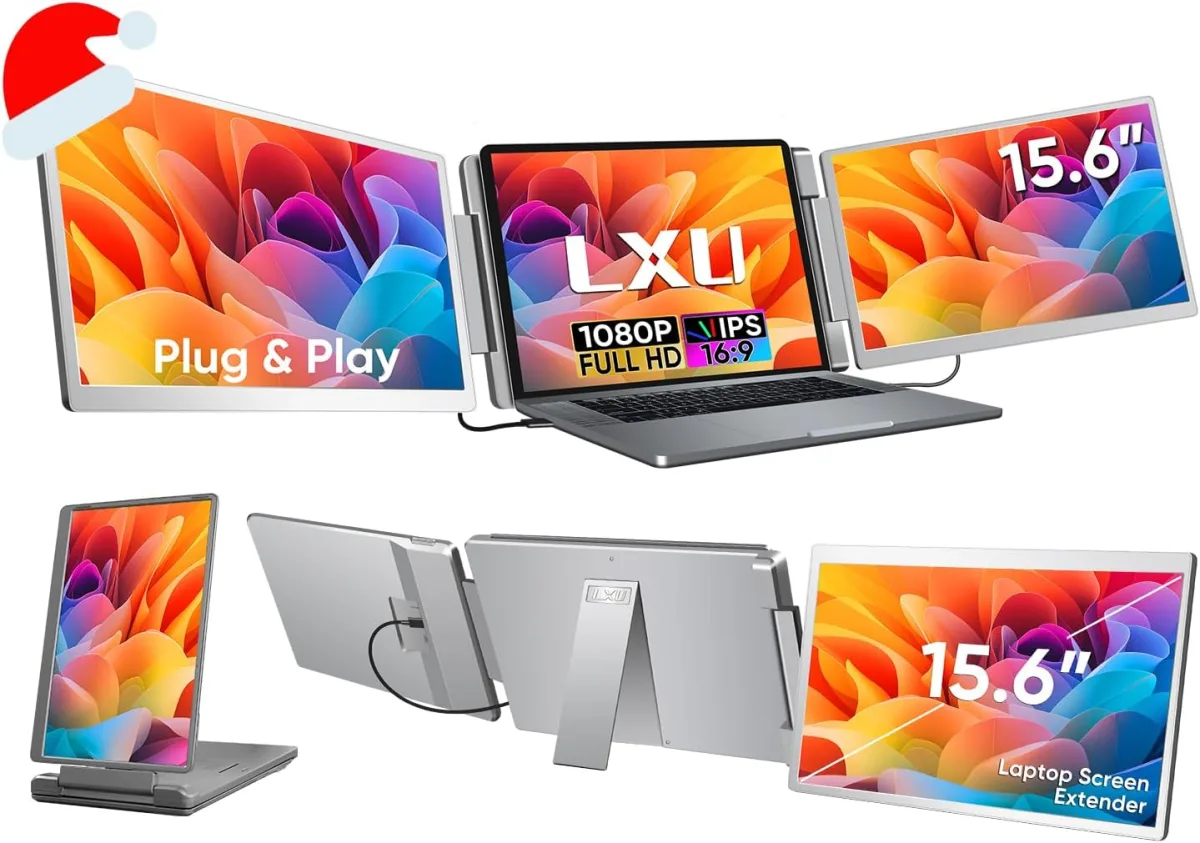
The promise of instantly turning my 15.6-inch laptop into a triple-screen workstation, especially with FHD 1080P IPS displays, was pretty enticing. I specifically needed something that would work with my Windows laptop, and the product description clearly stated its compatibility (and non-compatibility with M1/M2/M3 MacBooks, which is a crucial detail to note). It arrived well-packaged, and after unboxing, my initial impression was that it felt sturdier than I expected for a portable accessory.
Setup: Mostly Plug 'n Play, But Be Ready for Cables
The "Plug n Play" claim held mostly true. Setting up the LXU extender was surprisingly straightforward. It clamps onto the top of your laptop screen, and the two additional monitors slide out from either side. My 15.6-inch laptop fit perfectly, and the spring-loaded clamps felt secure without putting undue pressure on my laptop's lid. I did notice that if you have a very thin bezel on your laptop, the clamps might overlap a tiny bit, but it wasn't a functional issue.
Each screen requires a connection. For my setup, I used two USB-C to USB-C cables (one for each screen, handling both power and video) and then connected a separate USB-A to USB-C cable for additional power to the extender itself. Yes, that's three cables coming out of the extender, and you'll need enough ports on your laptop or a docking station. If your laptop has full-featured USB-C ports that support video output (DisplayPort Alt Mode) and power delivery, you might get away with fewer cables, but for optimal performance and brightness, I found using the dedicated power cable was best. It's not a deal-breaker, but it definitely creates a bit of cable spaghetti, which is something to consider for a "portable" setup.
Display Quality and Performance
Once everything was plugged in and my laptop detected the new displays, I was genuinely surprised by the quality. The 15.6" FHD 1080P IPS screens are sharp and bright. They don't quite match the vibrant colors or extreme brightness of my laptop's primary display, but they come remarkably close for auxiliary monitors. Viewing angles are good thanks to the IPS panels, so I didn't experience significant color shift when looking at them from an angle. I could comfortably work with text, spreadsheets, and even some lighter photo editing without complaint. There was no noticeable lag or stutter during general use, which was a huge relief.
The ability to adjust each screen's brightness, contrast, and color temperature independently using the small buttons on the side was a nice touch. I spent a few minutes tweaking them to get them as close as possible to my main screen's output. After a few weeks of consistent use, I've found these monitors to be incredibly reliable. Whether I'm at a coffee shop, a co-working space, or just my kitchen table, I can unfold this thing and have a serious workstation ready in minutes. If you're looking to elevate your mobile workspace, you can grab it on Amazon and see what a difference it makes.
Portability and Build Quality
The unit itself is surprisingly compact when folded up. It adds some bulk and weight to your laptop, making your combined setup noticeably thicker and heavier, but it still fits into my larger laptop backpack. It certainly won't fit into a slim sleeve anymore. The kickstand on the back of the extender is a thoughtful design element. It helps stabilize the entire setup, especially if your laptop screen hinges aren't super stiff, preventing the whole thing from tipping backward. Without it, I think it would feel much less secure. The overall build feels like a robust plastic, capable of handling the rigors of being transported regularly.
What I Liked (Pros):
- Significant Productivity Boost: Having two extra screens for multitasking is a game-changer. I can keep my main work on the laptop screen, reference materials on one extender, and communication apps on the other.
- Good Screen Quality: The 1080P IPS panels are sharp, offer decent colors, and good viewing angles for the price.
- Relatively Easy Setup: Mostly plug-and-play, especially if you have the right ports.
- Sturdy Build with Kickstand: Feels durable and the kickstand adds much-needed stability.
- Independent Controls: Each screen has its own controls for brightness and color, allowing for customization.
- Versatility: Works with a range of laptop sizes (12~17.3 inch) and both Mac (non-M series) and Windows.
What Annoyed Me (Cons):
- Cable Management: Three cables (two USB-C for video/power, one USB-A for additional power) can get messy. It's not as "clean" as I'd hoped.
- Power Consumption: It definitely draws a fair bit of power, noticeably draining my laptop battery faster when not plugged into a wall.
- Added Bulk & Weight: While portable, it transforms your sleek laptop into a bulkier, heavier package.
- Brightness Discrepancy: The extender screens aren't quite as bright as my laptop's primary display, and there was a slight, almost imperceptible difference in brightness between the two extender screens.
- No M1/M2/M3 MacBook Support: This is a big one for Apple users, so be aware before purchasing.
Who Should Buy This?
This LXU Laptop Screen Extender is perfect for:
- Remote Workers & Digital Nomads: If you need a serious workstation setup while traveling or working from various locations, this is a fantastic tool.
- Students & Researchers: Great for having multiple documents, research papers, and notes open simultaneously.
- Developers & Coders: More screen real estate for code, documentation, and debugging tools.
- Anyone Craving Productivity: If you feel constrained by a single laptop screen and want to boost your multitasking efficiency on the go, you should really check today's price.
Who Should Skip It?
- M1/M2/M3 MacBook Owners: Seriously, if you have one of these, this product isn't for you. Look elsewhere.
- Minimalists Obsessed with Cable-Free Setups: If you hate cables and bulk, this might annoy you.
- Those Needing Absolute Color Accuracy: While good, these aren't professional-grade color-critical displays.
- Users with Very Old Laptops: Make sure your laptop has the necessary USB-C ports with DisplayPort Alt Mode or enough regular USB ports for the adapter.
Final Thoughts
Overall, the LXU Laptop Screen Extender has become an indispensable part of my mobile workstation. It’s not perfect – the cables are a bit of a hassle, and it adds noticeable bulk – but the sheer boost in productivity I get from having two extra screens far outweighs these minor inconveniences. If you're serious about getting work done on the move and your laptop meets the compatibility requirements, I highly recommend giving this a try. It genuinely transformed my ability to multitask outside of a traditional office setup. It's a solid investment for anyone looking to seriously upgrade their portable productivity. You can pick one up here if you're ready to boost your screen real estate!