My Honest Take on the Shure MV7 Hybrid Microphone
As someone who dabbles in podcasting and occasionally streams, I’ve been on a quest for that perfect microphone – one that sounds professional but doesn't require an engineering degree to set up. I’d heard a lot of buzz about the Shure MV7, especially its lineage from the legendary SM7B, so I decided to take the plunge and grab it on Amazon. After several weeks of using it for everything from Zoom calls to recording voiceovers, I’ve got some pretty strong opinions.
First Impressions and Build Quality
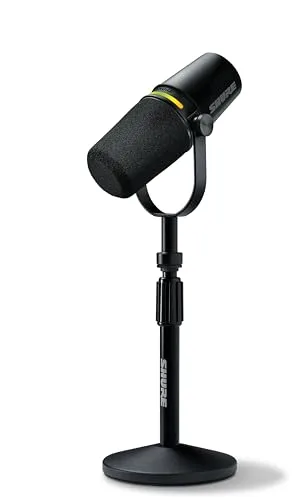
Out of the box, the MV7 feels substantial. It's got that reassuring heft of a well-built piece of equipment, made of metal and feeling very sturdy. No cheap plastic here, which is a huge relief when you’re spending this kind of money. It came with both a USB-A and a USB-C cable, which is thoughtful, along with a small desktop stand. The stand is basic but functional for getting started, though I quickly moved to my boom arm for better placement and ergonomics.
The design is sleek and understated. It definitely looks the part of a professional microphone without being overly flashy. I noticed the touch panel on the mic itself for volume and mute, which looked cool but also made me a little nervous about accidental touches.
Sound Quality: Where the MV7 Shines (Mostly)
This is where the Shure MV7 truly delivers. My voice, which often sounds a bit thin on cheaper USB mics, immediately gained warmth and presence. It has that broadcast-ready sound that makes you feel like you’re in a real studio. The clarity is excellent, and it does a fantastic job of rejecting background noise, thanks to its cardioid polar pattern. My noisy keyboard clicks and the hum of my PC fan were significantly reduced, which was a pleasant surprise.
I tested it both via USB directly into my computer and via XLR into my audio interface. Honestly, for most users, the USB connection is more than enough. The built-in DAC and preamp do a phenomenal job. The ShurePlus MOTIV app is a game-changer here. It lets you tweak EQ, compressor settings, and even offers an "Auto Level" mode which is incredibly effective. This mode adjusts your gain on the fly, keeping your levels consistent, which is a blessing for anyone not wanting to constantly monitor their audio. I found myself relying on it heavily for podcast recordings, and it made post-production much easier.
Using the XLR connection gives you a bit more flexibility if you have a high-quality interface, but the difference in raw sound quality for my voice wasn’t night and day compared to USB with the MOTIV app. It just gives you more professional headroom and options if you're already invested in an XLR setup. If you want to see what others paid for this versatile mic, it's worth a look.
What I Liked (Pros)
- Outstanding Voice Quality: Seriously, your voice will sound richer and more professional.
- Dual USB/XLR Connectivity: This is the MV7’s superpower. It offers incredible flexibility for different setups and skill levels.
- ShurePlus MOTIV App: The software control is intuitive and powerful, especially the Auto Level mode.
- Excellent Noise Rejection: It really helps to isolate your voice from common room noises.
- Robust Build: Feels like it could take a beating and keep on ticking.
- Headphone Monitoring: Zero-latency monitoring is essential, and it works perfectly here.
What Annoyed Me (Cons)
- Price: It’s not a budget mic. While you get what you pay for in quality, it’s a significant investment for beginners.
- Touch Panel Sensitivity: The touch controls on the mic itself are cool, but I found myself accidentally muting myself or changing volume a few times while adjusting the mic on my boom arm. A physical button might have been more practical.
- Included Stand: It's fine for getting started, but you'll quickly want a proper boom arm for optimal positioning and sound.
- USB Cable Length: The included USB cables are a bit short for my setup, requiring an extension for ideal routing.
- Not for Every Use Case: While great for vocals, it's not a condenser mic for delicate instrument recording. It’s dynamic, so it excels at close-proximity voice work.
Who Should Buy This?
The Shure MV7 is perfect for:
- Podcasters: The Auto Level mode and excellent voice quality make it a dream for consistent recordings.
- Streamers: Get that professional broadcast sound without needing a complex audio interface right away.
- Remote Workers/Online Educators: Sound incredibly clear on video calls and presentations, making a great impression.
- Voiceover Artists: Provides a rich, detailed vocal capture for narration and commercial work.
- Anyone Upgrading from a Basic USB Mic: If you're serious about your audio and want a significant step up, this is it.
Who Should Skip It?
- Strictly Budget-Conscious Buyers: If you just need a very basic mic for occasional calls and can't justify the cost, there are cheaper options (though with a noticeable drop in quality).
- Professional Studio Engineers: If you already have an elaborate XLR setup with high-end preamps and specialized condenser mics, the USB features might be redundant for you.
- Musicians Primarily Recording Instruments: While it can handle some instrument recording, a dedicated condenser mic might be better suited for capturing the nuances of acoustic instruments.
My Final Verdict
Despite a couple of minor gripes, the Shure MV7 has earned its spot as my go-to microphone. The hybrid USB/XLR functionality is truly its killer feature, offering pro-level audio with remarkable ease of use. It sounds fantastic, is built like a tank, and the ShurePlus MOTIV app provides invaluable control. If you’re serious about your audio and want a microphone that punches well above its weight in versatility and quality, I wholeheartedly recommend it. Don't hesitate to check today's price and see if it's the right fit for your audio needs.