My Journey to the Apex Pro Mini Gen 3
As a long-time PC gamer, I'm always on the hunt for any edge I can get, especially in fast-paced competitive titles. My old mechanical keyboard, while reliable, felt like it was holding me back with its fixed actuation points. When I saw the SteelSeries Apex Pro Mini Gen 3 pop up with its HyperMagnetic switches and Rapid Trigger, I knew I had to give it a shot. I've been using it for a few weeks now, diving deep into its features, and I've got some pretty strong opinions to share.
First Impressions & Build Quality
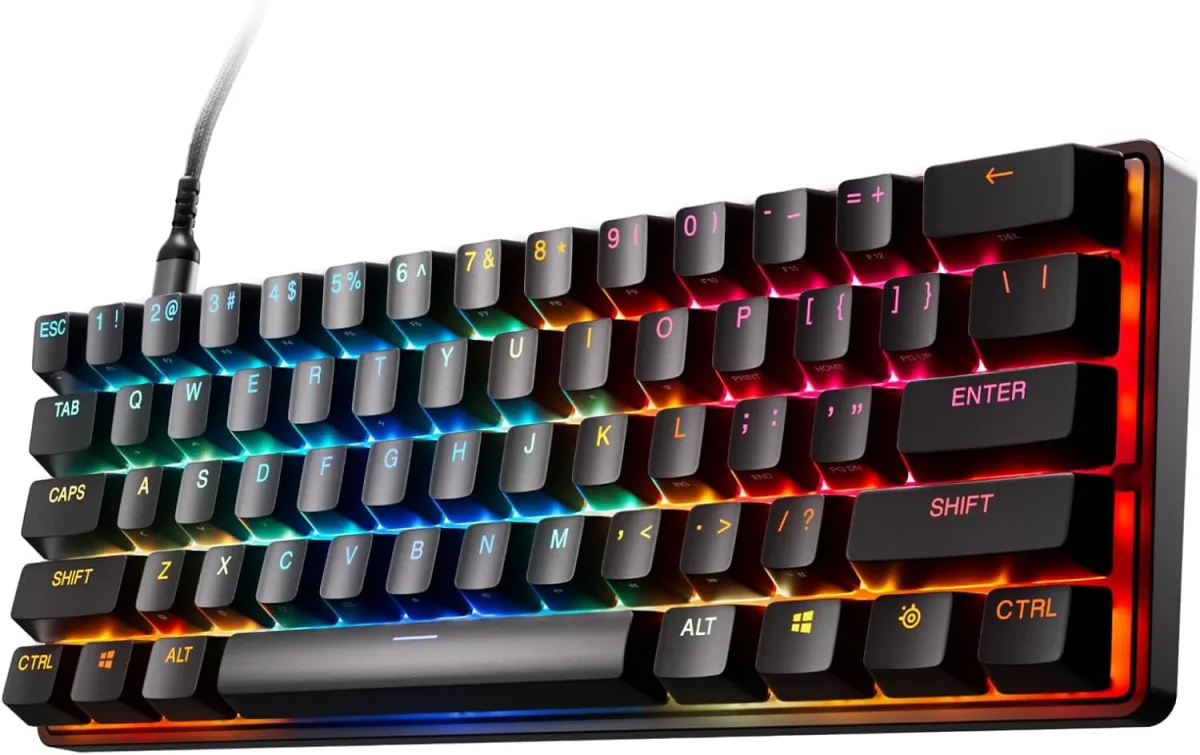
Out of the box, the Apex Pro Mini Gen 3 feels solid. Despite its 60% form factor, there's no flex in the frame, which is a good sign for longevity. The PBT keycaps are a definite upgrade from the ABS caps on many other premium keyboards. They have a nice textured feel, resist shine much better, and just generally feel more durable. The USB-C connection is standard these days, but it's always good to see, making it easy to swap cables if needed. The understated black aesthetic, combined with the vibrant RGB, looks really sleek on my desk.
The Star of the Show: OmniPoint 3.0 HyperMagnetic Switches
This is where the Apex Pro Mini Gen 3 truly shines, and honestly, it's the reason you'd even consider buying it. The OmniPoint 3.0 switches are a game-changer. SteelSeries promises adjustable actuation from 0.1mm to 4.0mm, and let me tell you, it works exactly as advertised. For twitchy FPS games like Valorant or CS:GO, I set my WASD keys to a super-sensitive 0.2mm. The difference in reaction time feels tangible; I noticed my counter-strafing was snappier, and peeking corners felt more precise. For typing or less critical keys, I could dial it back to a more comfortable 1.5mm or even 2.0mm to avoid accidental presses. It's truly incredible to have that level of customization.
Rapid Trigger: A Competitive Edge
The Rapid Trigger feature, which allows keys to register actuation and de-actuation at the same point, is a revelation. In practice, this means your key doesn't have to fully reset before you can press it again. For quick, repeated movements – think micro-adjustments in an FPS or rapid spell casting in a MOBA – this is a huge advantage. I found myself instinctively making quicker moves without even realizing it. There's a slight learning curve as your muscle memory adjusts to the hyper-responsiveness, but after a few hours, it just feels natural. If you're serious about competitive gaming, this feature alone makes it worth considering to check today's price.
Software Experience: SteelSeries GG
The SteelSeries GG software is essential for unlocking the full potential of this keyboard. It’s generally pretty intuitive. Customizing actuation points is easy with a visual slider. You can set Game-Ready Presets, which automatically switch profiles based on the game you're playing – a fantastic quality-of-life feature. I found the Protection Mode useful for certain games to prevent accidental key presses, and the Rapid Tap/SOCD (Simultaneous Opposing Cardinal Directions) settings are there for those who play fighting games or specific movement-heavy titles, though I didn't personally dive too deep into those. The RGB customization is also robust, allowing for per-key lighting and various effects, making my setup look pretty sweet.
The 60% Form Factor: Love It or Leave It?
This is probably the most polarizing aspect. I moved from a full-size keyboard, so going 60% was a big adjustment. On the one hand, it frees up so much desk space for mouse movement, which is fantastic for low-DPI gaming. On the other hand, you lose dedicated arrow keys, a number pad, and function row. SteelSeries uses a robust set of secondary functions accessible via the Fn key, and they're clearly labeled on the side of the keycaps. I got used to it faster than I expected, but if you rely heavily on those missing keys for work or specific games, prepare for a learning curve or consider a different form factor. For my gaming-focused setup, the trade-off was worth it. If you're curious about this compact beast, you can pick one up here.
Pros and Cons
Pros:
- Unrivaled Responsiveness: OmniPoint 3.0 switches with adjustable actuation and Rapid Trigger are truly revolutionary for competitive gaming.
- Premium Build Quality: Solid frame and durable PBT keycaps feel fantastic and will last.
- Deep Customization: SteelSeries GG software allows for granular control over every key, RGB, and profiles.
- Compact Design: The 60% form factor frees up valuable desk space.
- Vibrant RGB: Excellent per-key lighting options.
Cons:
- High Price Tag: This keyboard is an investment. You're paying for cutting-edge technology.
- Learning Curve for 60%: Losing dedicated arrow keys, function row, and Numpad can be a big adjustment for some users.
- Software Required for Full Potential: While good, you need the GG software to truly customize it.
- Sound Profile: The switches have a slightly "thocky" sound, which I don't mind, but some might prefer a quieter or clickier feel.
Who Should Buy This?
If you're a serious competitive gamer, especially in FPS or MOBA titles where every millisecond counts, and you're looking for an absolute edge, then the Apex Pro Mini Gen 3 is designed for you. If you value desk space and don't mind learning a new compact layout, and you have the budget for a premium peripheral, then you won't be disappointed. It’s for those who want the fastest, most customizable switches on the market. If that sounds like you, then grab it on Amazon.
Who Should Skip It?
If you're on a tight budget, or if you primarily use your keyboard for productivity tasks that require a Numpad or dedicated function keys, the 60% layout might be more of a hindrance than a help. Casual gamers who won't truly benefit from the micro-advantages of the HyperMagnetic switches might find the price hard to justify. If you prefer a full-size layout or a quieter typing experience, there are other excellent keyboards out there for less money.
Final Thoughts
The SteelSeries Apex Pro Mini Gen 3 isn't just another gaming keyboard; it's a statement. It’s a precision instrument designed to give competitive players every possible advantage. The OmniPoint 3.0 switches with Rapid Trigger are genuinely revolutionary, providing a level of control and responsiveness I haven't experienced anywhere else. While the price and the 60% form factor demand some consideration, for the right user – the dedicated gamer seeking peak performance – it’s an investment that absolutely pays off. I'm genuinely impressed with how it's improved my gameplay, and I don't see myself going back to a traditional mechanical switch anytime soon.